

How companies that take security seriously can use ChatGPT for business
How to use ChatGPT's business plans safely: Business vs. Enterprise, five security risks such as data leaks and insider misuse, and seven essential settings.
"Is it safe to use ChatGPT's business plans?"
That is the question from Lee, the head of the security team. Employees say they need AI for their work, and management wants higher productivity. But if customer data or trade secrets leak, the company's survival is at stake.
OpenAI says ChatGPT Enterprise does not use company data for training. It also has SOC 2 Type 2 certification and provides encryption, according to OpenAI. So is it really safe?
This article takes an objective look at what ChatGPT for business really is, how companies that take security seriously can use it safely, and what better alternative exists.
What is ChatGPT for business? Plans and features
ChatGPT has two business plans.
ChatGPT Business
This plan is for small teams. Any team of two or more can start right away.
It is self-serve: sign up and you can use it immediately. No sales meeting or contract negotiation is needed, so you can adopt it quickly.
It costs $25 per user per month. That price applies with annual billing; monthly billing costs more.
Key features are no training on company data, unlimited GPT-4 use, a 32K context window (about 24,000 words), and an admin console.
ChatGPT Enterprise
This plan is for large organizations or companies that need central management.
You have to go through OpenAI's sales team, and the contract is tailored to the company's size and needs.
Pricing is not public. You need an individual quote based on the number of users, usage, and the features you need.
It adds features that Business does not have. SSO (Single Sign-On) lets employees log in with their company account, and domain verification limits sign-ups to company email addresses. SCIM automatically deactivates the accounts of employees who leave, and role-based permissions control access by team and job level.
A 128K context window (about 96,000 words) handles longer documents, and you get unlimited high-speed GPT-4 and a usage analytics dashboard. You can also sign a DPA (Data Processing Agreement), a legal contract covering data processing.
Security features common to both plans
Both plans state that company data is not used to train models. Data is encrypted in transit and at rest, and both hold SOC 2 Type 2 certification.
Main uses
The most common uses are summarizing documents, writing up meeting notes, drafting proposals, and writing emails.
If you connect Google Drive or SharePoint, you can search internal documents. It is also used for data analysis support, translation, and research.
Item | ChatGPT Business | ChatGPT Enterprise |
|---|---|---|
Minimum users | 2 | Negotiable |
Cost | $25/user/month | Custom quote |
SSO | ✗ | ✓ |
Domain verification | ✗ | ✓ |
Context | 32K | 128K |
How to buy | Self-serve | Through the sales team |
Five security risks of ChatGPT for business
OpenAI says it does not use Enterprise data for training and that it provides encryption. But security risks come less from the product itself than from how it is configured and run.

Sensitive data typed into prompts
If employees type customer personal data, full contract text, source code, or financial information directly into prompts, that data is at risk of leaking.
Even if Enterprise does not train on it, the problem is that the data is sent to OpenAI's servers at all. You cannot rule out the servers being hacked, an insider accessing the data, or the data being disclosed under a legal demand.
The moment someone casually types in sensitive information, as in "Summarize last month's contract terms by customer," you lose control of it.
Overly broad connector permissions
Turning on connectors such as Google Drive, Slack, and SharePoint is convenient. But it widens the range of documents that can be reached, and if permissions are poorly designed, the risk of unauthorized viewing grows.
Say an employee should see only their own department's documents, but the ChatGPT connector is set up with access to the company-wide Drive. What happens? Information leaks that nobody intended.
A single question such as "Search all of our company's contracts" can pull up documents outside the employee's access rights.
Insider misuse
Employees with access can use search and summarization to extract sensitive information in bulk.
This is when someone indirectly gathers data beyond their own permissions with questions like "Rank everyone at our company by salary" or "Summarize the contract terms for every customer."
A particularly realistic threat is an employee who is about to leave using ChatGPT to compile large amounts of information before joining a competitor.
Shadow AI
When employees also use unapproved personal ChatGPT accounts or other AI tools, central control breaks down.
The moment an employee decides "Enterprise is inconvenient, I'll just use my personal account" and enters company data into a personal ChatGPT, every security control becomes meaningless.
Admins can check logs only in Enterprise; use of personal accounts cannot even be tracked.
Regulatory violations
If PII (personally identifiable information), PHI (health information), or other personal data turns up in AI responses, you risk violating regulations such as GDPR, CCPA, and HIPAA.
In finance in particular, under Korea's Financial Supervisory Service rules, simply sending customer information to an external server can be a problem. Public institutions face strict limits under the Electronic Government Act and the Personal Information Protection Act.
There have also been cases of medical institutions entering patient information into ChatGPT and being hit with large fines for HIPAA violations.
Security risk | How it happens | Potential impact |
|---|---|---|
Sensitive data input | Employees type it directly into prompts | Data leaks, legal liability |
Overly broad connector permissions | Drive/Slack connected too broadly | Unauthorized viewing, internal leaks |
Insider misuse | Bulk extraction by employees with access | Leaked secrets, risk when staff move to competitors |
Shadow AI | Personal accounts used alongside | Central control undermined |
Regulatory violations | PII/PHI sent to external servers | GDPR/HIPAA violations, fines |
How do you use it safely? Setup steps and countermeasures
Using ChatGPT for business safely requires seven essential settings.

Step 1: Classify your data
Sort all data into four levels.
Public covers marketing materials and press releases that can be shared outside the company. Internal covers meeting notes and general reports that employees can share with each other. Sensitive covers sales strategies and project plans restricted by department or job level. Highly sensitive covers financial statements, performance reviews, and contracts that only executives or specifically authorized people can access.
As a rule, nothing at the sensitive level or above goes into ChatGPT.
Step 2: Set up SSO, MFA, and SCIM
Use SSO (Single Sign-On) so people can log in only with company accounts. This blocks sign-ups with personal email at the source.
Use MFA (multi-factor authentication) so a password is paired with an authenticator app. This greatly lowers the risk of account takeover.
Use SCIM to automatically deactivate the accounts of employees who leave. Once HR processes a departure, ChatGPT access is blocked automatically too.
Without these settings, former employees can keep their access, or people can get around the controls with personal accounts.
Step 3: Set connectors to least privilege
The default is every connector turned off. Start with Google Drive, SharePoint, and Slack all disconnected.
Allow only the repositories you truly need, and redesign the permissions on each one for least privilege.
For example, connect only the sales Drive for the sales team and only the HR Drive for the HR team. Never connect the whole company Drive in one go.
Step 4: Control GPT sharing and external actions
Write a list of approved domains. Allow only your own company's domain and your partners' domains, and block the rest.
Separate GPT creation and sharing permissions by group. If every employee can build and share GPTs, control becomes difficult.
Require admin approval for third-party GPTs. With a GPT built outside the company, you cannot know what data it sends, or where.
Step 5: Put retention and deletion policies in writing
Define data retention periods. Be clear about how long conversation history is kept and when it is deleted.
Create a procedure for deletion requests. Document how you will handle a request from an employee or customer to delete their data.
Set the scope and frequency of log audits. You need a procedure for regularly checking who looked up what, and when.
Legal, security, and IT need to write this up together.
Step 6: Connect DLP and audit logs
Set up DLP (Data Loss Prevention). Design it so that a block or warning is triggered when resident registration numbers, card numbers, core source code, or contract language appear in prompts or outputs.
You can detect the resident registration number pattern (000000-0000000) with a regular expression, or filter keywords such as "contract" and "confidential."
Review audit logs regularly. You need a process for reviewing who asked what and which documents they accessed.
Step 7: Start with a pilot
Validating with one team (5 to 10 people) on non-sensitive work before rolling out company-wide reduces incidents.
Start with non-sensitive tasks such as writing up meeting notes, researching public materials, and drafting. Run it for about three months to find and fix problems.
Expand company-wide only after validation is complete.
Allowed vs. prohibited tasks
Allowed | Prohibited |
|---|---|
Writing up meeting notes | Entering customer ledger data |
Summarizing de-identified documents | Entering resident registration numbers |
Researching public materials | Entering medical records |
Drafting | Entering core source code |
Translation | Entering original contract text |
The reality: all of this takes a lot of work
SSO setup, connector permission redesign, DLP integration, a log audit system... it all takes specialist staff and time.
Security has to write the policies, IT has to implement the technology, and legal has to review the contracts. For small and mid-sized companies, that is a heavy load.
The bigger problem is real-time data. ChatGPT can read Drive and SharePoint, but connecting it directly to internal systems such as ERP or MES is hard.
Ask for "last month's sales in the Seoul region," and ChatGPT cannot query the ERP database directly. Someone has to extract the data by hand and upload it to Drive.
Is this your company? Consider DARVIS
Ask yourself three questions.
First, is it unacceptable for our company's data to go to external servers at all?
Second, does AI need to query real-time internal data from systems such as ERP, MES, and HR directly?
Third, are complex connector settings and a DLP build-out a burden?
If the answer to all three is yes, DARVIS is the answer.
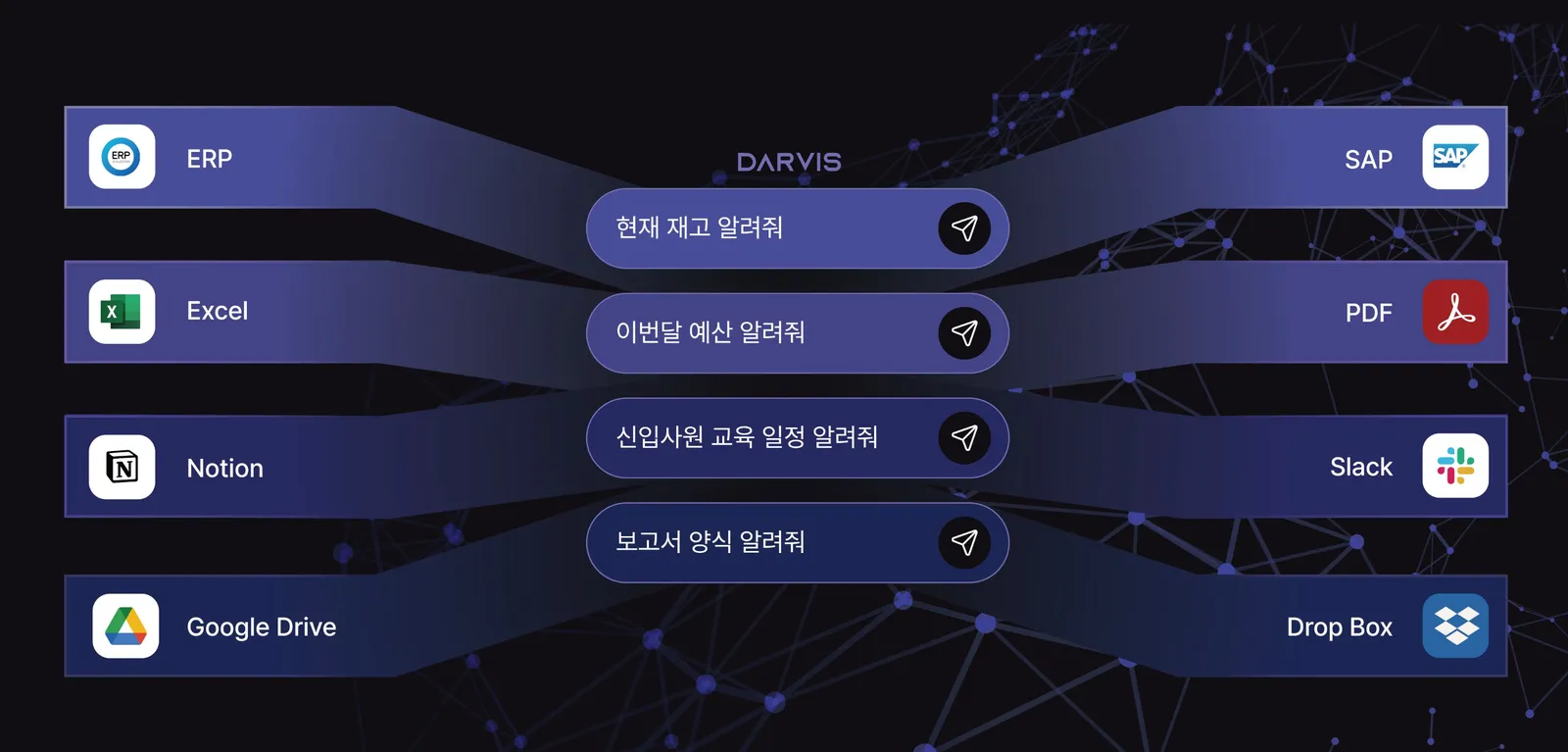
Your data does not leave the company
ChatGPT Enterprise is cloud-based. Even if it does not train on your data, the data is still sent to OpenAI's servers. However strong the encryption, the fact remains that data leaves the company.
DARVIS is on-premise. It is installed on the company's closed network, so data physically cannot go outside. Companies in finance, the public sector, and defense, where network separation is mandatory, can use it with confidence.
It queries real-time internal data directly
ChatGPT reads Drive and SharePoint through connectors, but connecting directly to ERP and MES is hard. Someone has to extract the data and turn it into documents.
DARVIS uses txt2SQL to turn a natural-language question such as "last month's defect rate on Line A" into a SQL query instantly and query the live database. It returns an exact figure.
Ask for "this week's sales volume of Product A in the Seoul region," and DARVIS goes straight to the ERP server and reads the data. No manual work is needed.
It uses your existing permission structure, with no complex setup
With ChatGPT, you have to set permissions again for every connector. Drive, SharePoint, and Slack permissions each have to be managed separately, and the process is very complex.
DARVIS keeps the permission structure of your existing ERP and HR systems as it is. Staff automatically see only staff-level data, and team leaders only their team's data. There is no need to build a new permission system.
It does not store data; it discards it immediately
ChatGPT keeps conversation history on its servers. Even after a deletion request, it is not certain whether the data is deleted right away or whether it remains in backups.
DARVIS delivers only the result of a query and discards the source data immediately. Only the answer, such as "Last month's sales were KRW 300 million," remains; the source data read along the way disappears without a trace.
The GUARDIA security system records every access transparently in an audit log. You can trace who looked up which data, and when.
Faster company-wide rollout
With ChatGPT, SSO setup, connector permission redesign, DLP integration, and pilot validation take a long time. Expect three months at the fastest and six months or more at the longest.
DARVIS connects to existing systems only logically, without touching them, so deployment is fast. Because data is not moved, no migration is needed, and your existing infrastructure is used as it is.
Item | ChatGPT Enterprise | DARVIS |
|---|---|---|
Deployment | Cloud (SaaS) | On-premise |
Data transfer | Sent to OpenAI servers | No external transfer |
Real-time DB queries | Limited (connectors required) | Direct queries via txt2SQL |
Permission management | Reconfigured per connector | Existing structure kept |
Data retention | Conversations stored on servers | Discarded immediately (volatile) |
Audit logs | Limited | Transparent records |
Fit for finance/public sector | Regulations need checking | Works in network-separated environments |
Which option fits your company?
When ChatGPT Enterprise fits

Industries with relatively light security regulation. These are companies in IT services, general manufacturing, retail, and similar sectors with no major restrictions on sending data to external servers.
If your work centers on Google Drive and SharePoint, integration is easy. This is the case when the main goals are writing, summarizing, and translating documents, and you do not need real-time database queries.
If you have no objection to cloud services and already use Google Workspace or Microsoft 365 in the cloud, adopting ChatGPT will come naturally.
It fits if general document writing and summarization are the main purpose and you do not need deep integration with specific systems.
When DARVIS fits
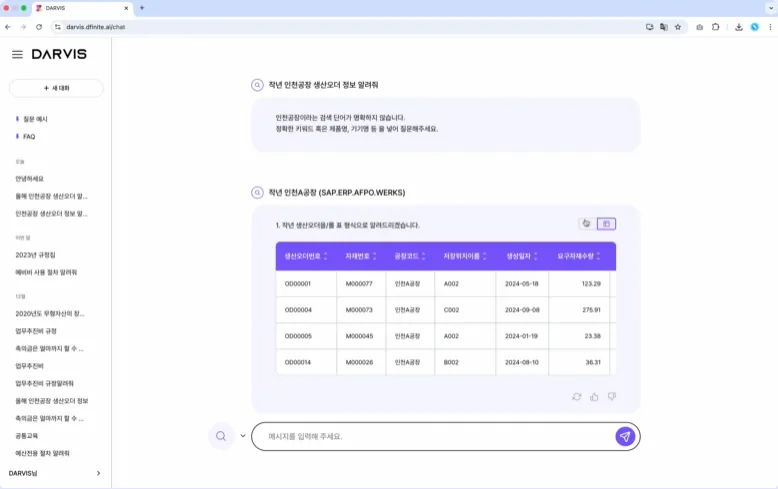
Industries with strict security regulation, such as finance, manufacturing, and the public sector. These are companies bound by the rules of the Financial Supervisory Service, the Personal Information Protection Commission, and the Electronic Government Act.
Sending data outside is itself a regulatory violation. Network separation is mandatory, or customer information cannot be sent to external servers.
Querying real-time internal data from ERP and MES is central. These companies need instant answers to questions like "last week's production volume," "this month's sales," and "current inventory."
Complex connector setup and a DLP build-out are a burden. These are small and mid-sized companies that are short on IT staff or need to adopt quickly.
They have to operate in a network-separated environment. These companies need to use AI on a closed network fully cut off from the external internet.
The question to ask about your company
"Is it acceptable for our company's data to be sent to external servers?"
If the answer is no, choose DARVIS.
Security is not something to compromise on. The safest data is data that does not move.
ChatGPT for business is clearly a powerful tool. But it has a fundamental limitation: it is cloud-based. For companies where security comes first, the on-premise DARVIS is the safer choice.
If you want practical AI insights and the latest trends, read the DFINITE DARVIS blog. We share AI know-how and real cases that show how to raise productivity at work.
For more AI insights, see the related posts below. Thank you.
We join scattered data with an ontology, flag what drifts first, and keep the evidence behind every decision.